 Foresight AI
Route tracking used to mean a dot on a map.
That dot never told you which stop is sliding, which customer is waiting, or which route is quietly breaking your SLA (service level agreement).
In 2026, route tracking software acts like execution control, stitching plans and reality into one running story. You see progress, delays, and exceptions in time to protect the day, not just explain it.
With CIGO Tracker, dispatch, drivers, and support work from the same live view, so updates stay consistent, and action stays fast. The 10 benefits below show how visibility cuts missed stops, escalations, and service drift.
Key Takeaways
- Route tracking software makes route progress visible, so you fix issues while the day is still recoverable.
- Real-time route tracking improves ETA accuracy because estimates reflect live progress and stop updates.
- Exceptions get handled faster when alerts, reason codes, and clear workflows guide the right response.
- Proof capture reduces disputes because evidence is complete, time-stamped, and easy to pull up.
- Reporting links execution to cost per stop and service performance, so leaders see impact clearly.
What Is Route Tracking Software?
Route tracking software turns a route plan into a live operating view. With real-time route tracking, you can see route health, stop status, and delay risk while crews are still on the road.
It also creates an auditable trail, since timestamps, location signals, and proof are captured at the moment work happens, which is a core expectation in modern fleet management software for 2026.
Peer-reviewed research from a Transportation Research Interdisciplinary Perspectives study describes fleet management control systems as monitoring vehicles in real time and supporting schedule-compliance assessment, which aligns with how modern fleet tracking software should measure execution in motion.
When that live record is shared across dispatch and support, delivery tracking software stops being a map and starts functioning as operational control. That is where predictable service starts.
What Route Tracking Covers
Route tracking software covers more than location. It links the plan to route health so you can see delays and variance building, and you can act while the day is still recoverable.
The UN/CEFACT specification frames traceability as events that capture what happened, when, where, why, and how, which is the structure a tracking view needs. It keeps status updates consistent across teams.
What you get is:
- Planned versus actual route progress and variance
- Stop outcomes with notes and reason context
- Proof and alerts tied to exceptions
That structure turns updates into decisions, and it sets up the benefits that follow.
Why Route Tracking Matters More in 2026
In 2026, delivery is part of the product, so an ETA is a promise, not a guess. When that promise drifts, your support queue swells and reattempts eat margin.
As reported by McKinsey research, consumers rank on-time delivery above speed, and about half track order status to confirm shipments stay on time. That pressure rises fast because last-mile delivery shapes consumer expectations around visibility, reliability, and proactive updates.
The Salesforce customer expectations data adds pressure: 79% want consistency across departments, yet 55% feel they are talking to separate teams and 56% repeat themselves. One live route record keeps dispatch and support aligned, so escalations get answers and proof stays clear.
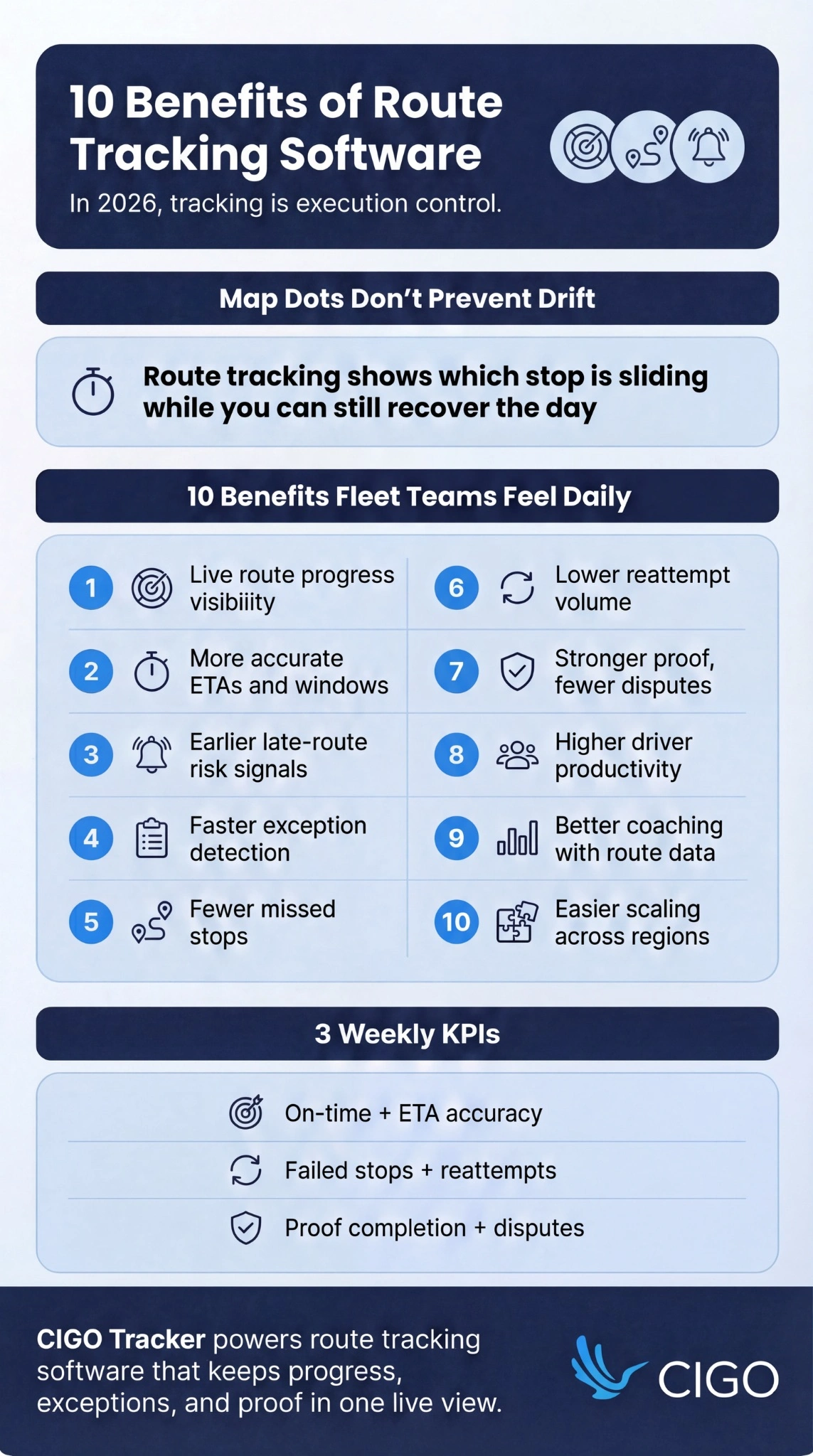
10 Benefits of Route Tracking Software in 2026
Here are 10 ways route tracking software strengthens visibility, ETAs, exceptions, proof, productivity, and scaling in 2026.
1) Real-Time Route Visibility for Dispatch and Supervisors
Real-time route tracking gives you live route progress, not a recap. You see which routes are healthy and which routes are trending late while there is still time to recover service.
This is where dispatch management systems earn their keep, because supervisors can intervene early instead of discovering the problem after the route collapses. The win is not the map itself. The win is earlier intervention, with fewer “we only found out at end of day” surprises.
If you want this benefit to stick, look for route health signals, planned-versus-actual progress, and stop aging so your team can spot drift without staring at a screen all day.
2) More Accurate ETAs and Better Delivery Windows
Static ETAs break trust because they ignore what is happening on the road and at the stop.
With route tracking software, your ETA updates from live progress, stop completion, dwell time, and route variance, and that accuracy improves even more when route optimization keeps sequencing and travel time realistic.
Peer-reviewed research in a PLOS ONE study shows ETA-based prediction improves when models add context like weather, time period, and special conditions. Apply that thinking to routes and your estimates stop drifting into guesswork, which reduces escalations and keeps dispatch and support aligned.
When the clock stays honest, exceptions become easier to spot early.
3) Faster Exception Detection and Response
Exceptions do not hurt because they exist. They hurt when they surface late, and they show up without enough context to act.
With clear alerts, you see delays, access issues, and failed stops while the route is still in motion. Reason codes add the missing “why,” so dispatch can choose a response that fits the situation, not a generic workaround.
- Flag late-route risk early, before service windows collapse
- Capture a reason at the moment of failure, while details are still fresh
- Trigger the right action fast: reschedule, reattempt, reroute, or notify the customer
Handled this way, exceptions stop being surprises and start being controlled decisions, which also cuts missed stops and repeat visits.
4) Fewer Missed Stops and Lower Reattempt Volume
Missed stops seldom come from one mistake. They come from small gaps: unclear stop status, silent failures, and routes that drift off sequence.
By the time anyone notices, the vehicle is miles away and the stop still becomes a reattempt.
Route tracking fixes this by making completion explicit and consistent at every stop.
When a stop fails, the driver logs the reason in the moment, so dispatch can recover service the same day. Required fields by stop type keep “delivered” from turning into a catch-all.
5) Lower Support Load and Fewer WISMO Contacts
Support load spikes when visibility is fragmented. Customers ask “Where is my order?” because progress is unclear, and the ETA feels like a moving target.
That behavior is consistent with how people use tracking today.
Pitney Bowes BOXpoll data reports consumers checked order tracking an average of 2.8 times per order in 2023. When tracking becomes self-serve, fewer questions land in your queue, and the answers stay consistent when they do.
- Support works from the same live view as dispatch
- Updates stop bouncing across chats and calls
- Customers escalate less because progress is visible
6) Stronger Proof of Delivery and Fewer Disputes
Proof of delivery is a cost center when it is incomplete. It becomes a service asset when it is consistent, time-stamped, and easy to retrieve.
That’s the difference between “a photo somewhere” and electronic proof of delivery that’s structured, searchable, and defensible.
Electronic proof standards typically combine photos, signatures, timestamps, and location validation. That mix makes disputes easier to resolve because the evidence is specific and structured, not scattered in messages.
When proof capture is part of the driver workflow, you reduce “missing POD” tickets and shorten resolution cycles. You also improve internal accountability because outcomes are auditable.
7) Higher Driver Productivity with Cleaner Stop Workflows
Drivers lose minutes in messy workflows, and those minutes stack up across a full route.
Calls to dispatch fill the gaps. Duplicate data entry creeps in, and status updates turn inconsistent because the app does not match what happens at the curb.
Cleaner stop workflows remove that drag. The IRU e-CMR page highlights how electronic transport documents accelerate administration through reduced data entry and provide real-time access to information and proof of pick-up and delivery.
With that standard in place, delivery tracking software feels like operational support, and the time you reclaim shows up in more completed stops and cleaner performance patterns for coaching.
8) Better Accountability and Coaching Using Route Data
Coaching works when you can point to a repeatable pattern, not a one-off story. Route data gives you that footing, so feedback feels fair, specific, and easy to act on.
You can see where time leaks through dwell time, late starts, and route duration variance, and you can also spot recurring failures by zone or stop type. That shared evidence aligns drivers and dispatch because everyone is looking at the same facts, and the fixes become practical.
- Planned vs actual variance: surfaces where routes drift, so coaching targets execution habits, not opinions
- Dwell time outliers: reveal which stop types or behaviors are slowing routes, so training gets precise
- Repeat exception reasons: show process gaps that dispatch and drivers can correct together, with the same playbook
- Late-start patterns: highlight avoidable ramp-up issues, so managers can tighten readiness without guesswork
9) Improved Planning Decisions Using Execution History
Planning gets sharper when execution history is trusted, because it turns opinions into operating facts. Stop-time history shows how long each stop type really takes, so schedules and staffing stop relying on averages.
That same history becomes far more usable when it feeds into route scheduling software decisions like sequencing rules, staffing levels, and delivery windows.
From there, route variance highlights lanes where drift repeats, which gives you a clear reason to adjust delivery windows, access instructions, or sequencing rules.
Cost control follows the same thread. When plans reflect real stop behavior, overtime drops and reattempt mileage shrinks because preventable misses surface earlier. Dispatch also spends less time rescuing routes through heroic interventions, and more time running a consistent process that scales.
10) Easier Scaling Across Routes, Regions, and Partners
Scaling fails when every region speaks a different language. One team marks a stop “failed,” another calls it “reschedule,” and proof rules shift by site, so reporting stops being trusted.
Route tracking software fixes this by standardizing statuses, evidence, and exception workflows across routes and partners. Contractors onboard faster because training follows one repeatable playbook, and multi-site teams report the same KPIs.
With one shared process, service stays consistent as volume, regions, and vendors grow.
How These Benefits Show Up in KPIs
KPIs turn route visibility into measurable service, cost control, and team accountability.
- On-time performance: confirms whether delivery commitments are being met consistently
- ETA accuracy: shows how closely promised windows match actual arrival outcomes
- Stops per route: tracks route capacity and planning efficiency
- Stops per hour: reflects true productivity without relying on anecdotes
- Failed stop rate: quantifies execution breakdowns at the stop level
- Reattempt rate: exposes avoidable repeat visits that inflate cost and workload
- Dwell time: pinpoints where routes lose minutes at specific stop types or zones
- Route duration variance: highlights routes that drift from plan and require intervention
- Proof completion rate: measures whether evidence is captured for every required stop
- Dispute rate: indicates how often deliveries get challenged and consume resolution time
- Cost per stop drivers: ties overtime, delays, rework, and support contacts to execution gaps
Features to Look for in Route Tracking Software (2026 Checklist)
Use this checklist to choose the right route tracking software that supports execution, proof, and reporting.
- Live route map with route health indicators, so dispatch can spot risk early
- Stop status workflow with required fields, so every update stays consistent and usable
- ETA engine with continuous updates, so delivery windows remain credible during the shift
- Alerts for delays, missed-stop risk, and exceptions, so issues surface with context
- Proof capture: photo, signature, notes, timestamps, and geo validation, so outcomes are defensible
- Exception tools: reason codes, reschedule support, and contact logs, so recovery actions stay clear
- Reporting dashboards and exports, so leadership can track service levels and cost per stop drivers
- Role-based access, audit logs, and retention controls, so operational data meets governance needs
Implementation Best Practices
Implementation works when field reality and system language match.
Define stop statuses and exception reasons drivers recognize, so every update stays consistent. When the vocabulary is clear, dispatch can act fast.
From there, set proof rules by delivery and customer type, keeping outcomes audit-ready without adding pointless steps. Pilot a small set of messy routes with KPI targets, and train with real scenarios like gate codes and no-shows.
The U.S. Department of Energy’s AFDC notes telematics feedback can help drivers reduce fuel use, so clean signals also support coaching.
Metrics to Track After Go-Live
| Metric group | What it measures | Weekly check |
| On-time rate + ETA accuracy | Whether promises match reality | Trend by route/zone + biggest misses |
| Late-route alerts | How early risk is detected | Which alerts led to real intervention |
| Failed stops + reattempts + reason codes | Avoidable misses and root causes | Top reason codes and repeat hotspots |
| Dwell time + route duration variance | Where routes lose time and drift from plan | Outliers by stop type/customer type |
| Proof completion + disputes per 1,000 stops | Evidence quality and defensibility | Missing proof patterns + dispute triggers |
| Support contacts tied to visibility | WISMO pressure tied to tracking gaps | Volume by reason + spike timing |
How CIGO Tracker Supports Route Tracking Outcomes
With CIGO Tracker, route tracking stays connected from dispatch decisions to doorstep proof.
Our delivery tracking view keeps routes and stops current, so support answers from the same truth.
As plans shift, customer engagement tools send proactive updates that reduce follow-ups. You tighten ETAs with optimized routing built in. At the same time, security controls protect access, audit trails, and retention, so every status and photo remains defensible.
Route Tracking Software Streamlines Everything
Route tracking software in 2026 rewards teams who act early. Visibility sharpens, exceptions surface sooner, proof stays reliable, and performance becomes measurable in a way your team can feel day to day.
So run a quick self-audit before you change tools or processes. Look for four gaps: ETA accuracy, failed stops, proof standards, and reporting speed.
When those gaps show up, you are not short on effort, you are short on execution control.
With CIGO Tracker, you can bring execution, proof, and reporting into one consistent workflow, so your team spends less time chasing clarity. If you want to see what that looks like using your routes and stop types, book a demo.
FAQs
What is route tracking software, and how is it different from GPS tracking?
Route tracking software manages execution across the route and each stop, not just position. GPS tracking shows where a vehicle is. Real-time route tracking adds stop status, exceptions, dwell time, and proof you can audit.
Which features improve ETA accuracy the most?
ETA accuracy improves when estimates update from live progress, not static averages. Fleet tracking software should use stop completion, dwell time, and route variance to refresh windows, so dispatch and support speak from one clock.
Which proof-of-delivery standards reduce disputes the fastest?
Disputes drop when proof is consistent and captured at the door. Delivery tracking software should require a timestamp, location validation, and a signature or photo, plus brief exception notes when access fails.
Which KPIs should fleet operators review weekly?
Review weekly KPIs that show service and failure patterns, not vanity volume. Pair on-time rate with ETA accuracy, watch failed stops and reattempts, and track dwell time by stop type to find where margin leaks.
How long does a realistic rollout take for a mid-sized fleet?
A mid-sized rollout moves fastest when workflows are standardized before scale. Start with a pilot of real routes, lock stop statuses and proof rules, and train with exceptions. Teams expand once data stays consistent.