
Most fleet operations teams conflate delivery scheduling software and capacity management software, and that confusion plays out in collapsed routes every single day.
Scheduling controls when your deliveries run. Capacity management, however, controls whether your fleet can realistically execute them. When you rely on a scheduling tool to do both jobs, overcommitment becomes inevitable because the tool simply cannot see your actual fleet limits.
Routes that look fine at dispatch fall apart before end of shift, leaving you reacting instead of planning. CIGO Tracker bridges both functions so you can stop doing that.
Key Takeaways
- Delivery scheduling software sequences stops, assigns drivers, and manages execution windows.
- Capacity management software enforces limits on driver hours, vehicle availability, and stop-count caps.
- Using scheduling software as a capacity check tells you what is planned, not whether it is executable.
- Scheduling is same-day and operational. Capacity management is multi-day and strategic.
- Fleets that deploy both reduce overcommitment, lower reattempt rates, and improve cost-per-stop.
What Is Delivery Scheduling Software?
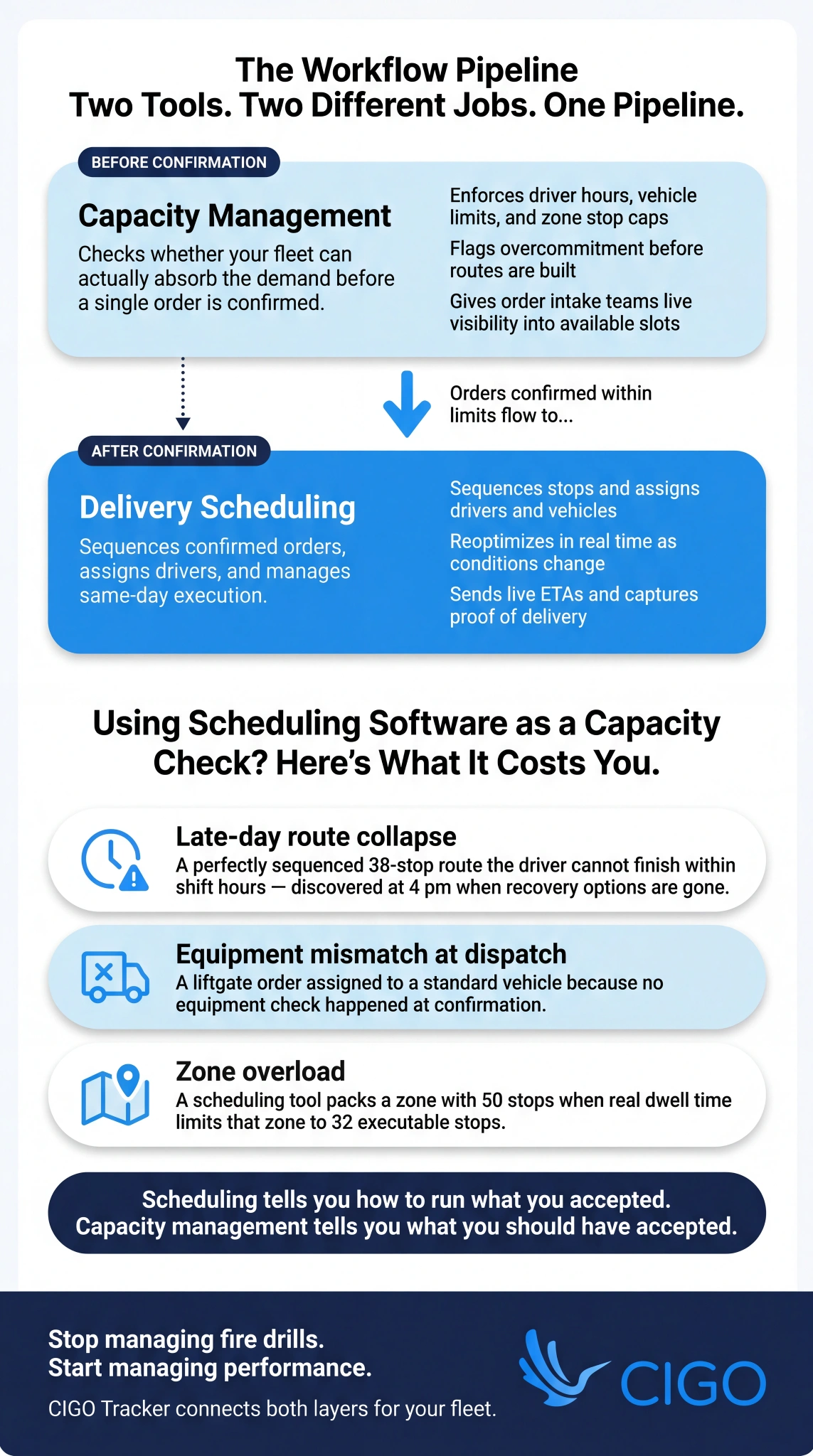
Delivery scheduling software is an operational tool that organises your confirmed orders into sequences, assigns them to drivers and vehicles, and manages the execution timeline for a given planning window.
It answers one core question: given what you have already committed to, how do you execute it as efficiently as possible?
The planning horizon is same-day to next-day, with real-time adjustments as orders are added, drivers call out, or traffic conditions change. What most teams miss, however, is that scheduling efficiency has a ceiling. If your underlying routes are bloated or poorly structured, even the best scheduling tool inflates driver hours and cost-per-stop.
Understanding how fleet routing software reduces costs at the route level explains why scheduling alone cannot close that problem.
Core Features of Delivery Scheduling Software
- Stop sequencing and route assignment: organises confirmed orders into efficient stop sequences and assigns them to the best-available driver and vehicle.
- Driver and vehicle assignment: matches those orders to available resources based on shift, zone, equipment type, and workload.
- Real-time dispatch and resequencing: updates assignments and sequences as conditions change throughout the day, keeping execution on track.
- ETA calculation and customer notification: generates delivery windows from live route progress and sends automated customer updates accordingly.
- Proof of delivery and exception capture: records completion status, captures signatures or photos, and flags failures immediately for follow-up.
What Problems Delivery Scheduling Software Solves Well
Scheduling software earns its keep in same-day execution.
It sequences your stop list into the most efficient order within driver hours and time windows, then dynamically reassigns stops when a driver or vehicle becomes unavailable mid-day.
Beyond dispatch, it communicates accurate ETAs to your customers and updates them in real time as the route progresses. It also captures exceptions, such as failed deliveries or access issues, at the point of occurrence.
That matters because, according to OpenSend research, each failed delivery attempt costs an average of $17.78. Scheduling software reduces those occurrences when it operates on clean, confirmed orders.
What Is Capacity Management Software?
While scheduling software manages execution, capacity management software operates one step earlier. It measures, allocates, and protects your available delivery resources before you commit to any demand.
Those resources include drivers, vehicles, stop slots, and equipment constraints.
The core question it answers is whether your fleet can actually absorb what you are about to accept. That means the planning horizon is multi-day to weekly, with real-time enforcement applied at the point of order confirmation, not after the route collapses.
Core Features of Capacity Management Software
- Zone and day capacity calendars: configurable stop caps and booking slots organised by zone, equipment type, and driver availability.
- Constraint modelling: accounts for driver hours-of-service limits, vehicle payload and cube limits, equipment-type availability, and dwell time assumptions.
- Demand forecasting: projects order volume by zone and day so capacity gaps become visible before they turn into day-of problems.
- Booking controls and approval workflows: enforces caps at the order confirmation stage and routes above-cap requests through an approval process.
- Overcommitment alerts: flags zones, equipment types, or time windows approaching capacity before the threshold is actually breached.
What Problems Capacity Management Software Solves Well
Capacity management prevents overbooking before orders are confirmed, closing the structural blind spot that scheduling tools leave open. Rather than discovering overcommitment at dispatch, it enforces your driver and equipment constraints at the booking stage, where the problem is still fixable.
It also gives your order intake teams live visibility into which zones and slots are actually available, so your customer promises reflect real capacity.
McKinsey research on logistics visibility confirms that real-time visibility tools have seen above-average investment rates precisely because late-stage data costs more to act on than early-stage data.
Key Differences: Delivery Scheduling vs. Capacity Management
Understanding delivery scheduling vs capacity planning comes down to four dimensions.
| Delivery scheduling | Capacity Management | |
| Scope | Execution-focused: how to run what is already booked | Planning-focused: whether to accept what is being requested |
| Timing | Acts after orders are confirmed | Acts before or at the point of confirmation |
| Output | Route plan and driver assignment | Booking decision and resource allocation |
| Failure Mode | Plan built on overcommitted resources | Limits set incorrectly or overrides left unchecked |
When to Use Each
Choosing the right tool depends on where you are in the delivery workflow.
- Use delivery scheduling software when orders are confirmed and your question is how to sequence, assign, and execute them efficiently.
- Use capacity management software when orders are incoming and your question is whether your available resources can actually support the demand.
- Use both when you want to prevent overcommitment upfront and execute the resulting plan cleanly. That combination is where dispatch management systems close the loop between planning and execution, turning good decisions into reliable outcomes.
Where They Overlap and How They Work Together
Both tools draw from the same data: your driver availability, vehicle assignment, and zone capacity. That shared foundation is what keeps both accurate.
Capacity management sets your limits. Scheduling then operates within them.
As your execution data, including actual stop times and failure reasons, feeds back into the capacity model, your forecast accuracy improves over time. That feedback loop is where the real compounding value lives.
The Problem With Using Scheduling Software as a Capacity Tool

Scheduling software shows you what has been planned, not whether it can actually be executed. When you treat a routed plan as a capacity check, you are confusing output with input.
Overcommitment stays invisible until routes are already built. By then, the cost of recovery through reattempts, overtime, and spot coverage is locked in.
Why Scheduling Alone Doesn’t Prevent Overcommitment
Scheduling software accepts whatever orders you give it. It does not question whether the total volume fits within your driver hours, equipment availability, or zone stop limits.
A fully scheduled route can still be overcommitted. Forty stops may sequence efficiently, but if those stops require ten hours and your driver’s shift is eight, the plan fails at execution.
Deloitte research puts last-mile delivery at 30-35% of total delivery cost, meaning every route collapse hits your margin directly. Scheduling tools have no booking-stage enforcement layer to stop that from happening.
Real-World Failure Modes When the Two Are Confused
- Late-day route collapse: a perfectly sequenced 38-stop route the driver cannot complete within shift hours, discovered at 4 pm when recovery options are already gone.
- Equipment mismatch at dispatch: a liftgate order assigned to a standard vehicle because no equipment check occurred at the point of confirmation.
- Zone overload: a scheduling tool that packs a zone with 50 stops when real dwell time limits that zone to 32 executable stops.
- Reattempt accumulation: missed delivery windows on the back half of a route caused by early-stop dwell time inflation that the scheduling tool could not have predicted without capacity-layer input.
Do You Need Both? How They Work Together
For small fleets with stable, low-volume demand, delivery scheduling software may be sufficient. Overcommitment risk is low and exceptions are manageable manually.
For growing fleets, high-frequency operations, or 3PLs managing shared resources, however, you need both. Capacity management enforces what you can accept. Scheduling then optimises what you have accepted. Together, they close the gap between what you promise and what your fleet scheduling software stack delivers consistently.
The Integrated Planning Stack
Demand comes in. Capacity management checks your zone caps, driver hours, and equipment availability before a single order is confirmed.
Scheduling then sequences and assigns within those verified limits.
As execution data flows back into the capacity model, your forecast accuracy improves with every cycle. Over time, both tools get sharper. You stop managing fire drills and start managing performance.
Key Features Checklist: What to Look For in Each
| Delivery scheduling | Capacity Management | Integration Requirements | |
| Sequencing & Assignment | Stop sequencing, route assignment, driver and vehicle matching | Zone and day capacity calendars with configurable stop caps | Shared driver and vehicle data layer across both tools |
| Real-Time Adjustments | Resequencing and dispatch as conditions change | Overcommitment alerts and override tracking | Real-time cap updates as each order is confirmed |
| Forecasting & Visibility | ETA calculation and automated customer notification | Demand forecasting by zone and day to surface gaps early | Execution data export from scheduling back into the capacity model |
| Controls & Compliance | Proof of delivery and exception capture at point of occurence | Booking controls and approval workflows enforced at confirmation | |
| Constraint Handling | Driver hours and vehicle availability | Hours, equipment, cube, and weight constraint modelling |
What Data Each Tool Needs to Work Effectively
Delivery scheduling software needs your confirmed orders with stop addresses and time windows, driver shift patterns, vehicle assignments, and real-time traffic data.
Capacity management software, however, runs on historical demand by zone and day, dwell
time actuals, driver hours-of-service limits, equipment inventory, and your reattempt and failure data by zone.
The overlap is intentional. Both tools rely on your driver and vehicle data, which is exactly why a shared data layer prevents the drift that leads to overcommitment.
Implementation Best Practices

Deploy capacity management before scheduling. Your scheduling tool is only as good as the constraints it operates within, so get the capacity model right before optimising execution.
Use a shared data layer. Disconnected driver, vehicle, and zone data creates the same overcommitment problem both tools are meant to solve.
Start conservatively, setting initial stop caps at 85 to 90 percent of theoretical maximum. Then review your integration loop monthly, feeding actual stop times and reattempt data back into the capacity model.
Common Mistakes to Avoid
- Using your scheduling tool’s route builder as a capacity check. It tells you the best sequence for what you have already accepted, not whether you should have accepted it in the first place.
- Running the two tools on separate data. Disconnected driver availability or zone definitions between your systems create exactly the overcommitment problem both tools are meant to close.
- Skipping the override workflow in your capacity tool. Unlimited overrides recreate the overcommitment problem inside the capacity system itself.
KPIs Each Tool Should Move
Your scheduling software should improve:
- On-time delivery rate and ETA accuracy
- Stops-per-route and average stop completion time
- Reattempt rate from day-of execution failures
Your capacity management software should improve:
- Overcommitment rate and override frequency
- Zone utilisation rate and above-cap booking volume
- Reattempt rate from planning-stage over-acceptance
Together, both tools drive down your cost-per-stop, driver overtime, and spot coverage incidents.
Those metrics only move when both are deployed in tandem, which is why tracking the right fleet manager KPIs across both tools is what separates reactive operations from consistently performing ones.
How CIGO Tracker Connects Scheduling and Capacity Management
With CIGO Tracker, actual stop times, dwell actuals, and failure reasons flow directly back into both your scheduling sequences and capacity model.
Delivery tracking gives you real-time route visibility so you can rebalance before late deliveries cascade. Logistics optimization then surfaces recurring failure patterns by zone or stop type, correcting them in the planning layer rather than managing them as dispatch fire drills.
Future Trends
The line between scheduling and capacity management is blurring.
Unified planning platforms now integrate both functions into a single data layer with role-based views for planners, dispatchers, and order intake teams.
AI-driven capacity forecasting is also maturing. McKinsey’s State of AI research found 55% of organisations have already adopted AI in their operations, and capacity forecasting is where you will see the most direct impact on overcommitment prevention.
Real-time feedback loops between scheduling and capacity will only tighten from here.
Are You Running Both Tools, or Just One?

Scheduling software optimises execution. Capacity management software prevents overcommitment. Using one without the other leaves a gap that shows up in reattempts, overtime, and broken delivery windows.
CIGO Tracker connects both layers, so the route optimisation fundamentals you’ve invested in actually deliver results. Start a free trial or contact us today to see how it works for your fleet.
FAQs
What is the difference between delivery scheduling software and capacity management software?
Delivery scheduling software sequences confirmed orders and assigns drivers for efficient execution. Capacity management software controls whether your fleet can accept new demand by enforcing driver, vehicle, and zone limits before confirmation.
Can delivery scheduling software replace capacity management software?
Scheduling software accepts all orders without questioning capacity limits. It optimises execution but cannot prevent overcommitment. You need capacity management to enforce booking-stage controls that protect your fleet resources.
Do I need both delivery scheduling and capacity management software?
Growing fleets and high-volume delivery operations benefit from both. Capacity management prevents overbooking. Delivery scheduling software optimises the confirmed plan. Together, they close the gap between what you promised and what you can execute.
How do delivery scheduling and capacity management software work together?
Capacity management sets zone caps, driver limits, and equipment constraints. Orders confirmed within those limits flow to scheduling software for sequencing. Execution data feeds back into the capacity model, improving accuracy over time.
What KPIs improve when you use both tools together?
Combined deployment drives down cost-per-stop, driver overtime, and spot coverage incidents. Scheduling improves on-time rates and stops-per-route. Capacity management reduces overcommitment and above-cap booking volume across your fleet.