 Foresight AI
Spreadsheets don’t break at ten deliveries. They break at three hundred, across four zones, with installs and pickups that each carry different time and crew requirements.
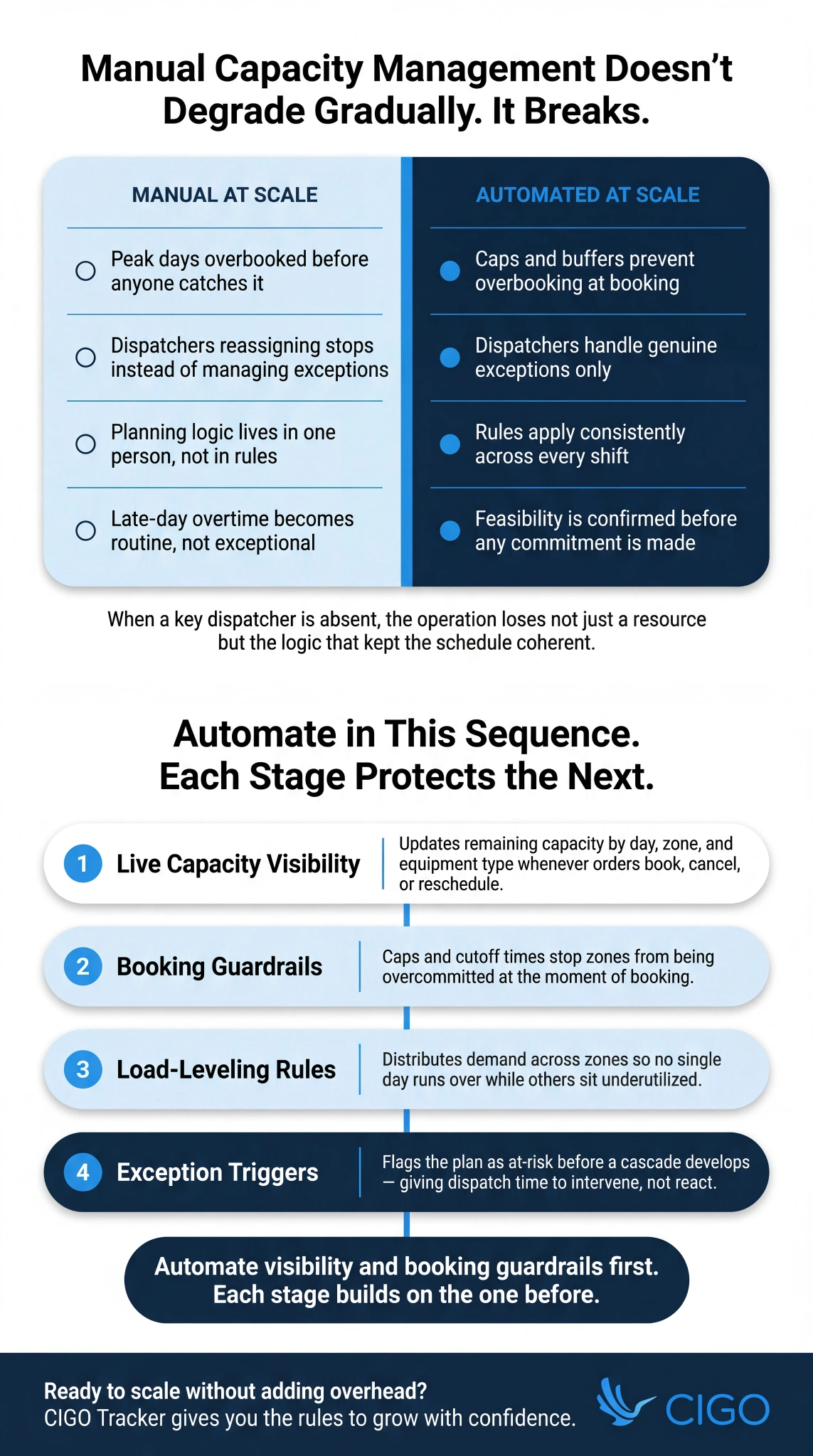
This is where manual capacity management breaks down, and why capacity management automation becomes essential. Without it, dispatchers stop managing exceptions and start reassigning work. Peak days get overbooked because no one caught the constraint at the booking stage.
CIGO Tracker is built for what comes next. This guide covers what to automate, the guardrails that protect service levels, and the KPIs that confirm scaling is working.
Key Takeaways
- Capacity management automation turns fleet capacity into a live system of rules, not a stale snapshot.
- The biggest win is feasibility: fewer overbooked days and commitments the fleet can actually keep.
- Automated fleet management works best paired with caps, buffers, and human-controlled approval workflows.
- Real-time signals keep the plan current so customer promises stay credible throughout the day.
- Track manual touches, override frequency, on-time performance, and cost per stop week over week.
What Is Capacity Management Automation?
Capacity management automation automatically updates available capacity and applies allocation rules so orders, schedules, and routes stay feasible as demand and conditions change.
It replaces manual work that does not scale.
Booking limits set in a spreadsheet go stale by mid-morning and the dispatcher carrying all the logic in their head is unavailable when it matters most.
Penske’s Transportation Leaders Survey found that 77% of transportation professionals still rely on traditional annual forecasting for planting decisions, with the average manual fleet planning decision taking one to three weeks.
Capacity management automation encodes those decisions into rules the system applies consistently: availability updates, load-leveling, booking guardrails, and exception-triggered replans. Feasibility is confirmed before any commitment is made, not discovered after the truck rolls.
Where It Sits Inside Automated Fleet Management
Automated fleet management covers execution: routing, dispatch, driver workflows, tracking, and proof collection. Capacity management automation sits upstream of all of that.
Its job is to protect what gets committed before execution begins, so dispatch is never handed a schedule it cannot keep. When both layers share the same data, the distance between what was promised at booking and what dispatch discovers at route-build narrows considerably.
Most days run as planned.
The Scaling Problem Automation Solves

Twenty stops a day is a scheduling problem. Two hundred is a structural one.
Manual capacity decisions do not degrade gradually as volume increases. They break differently, and the consequences show up in costs, not just missed windows.
iDrive Logistics research on last-mile delivery benchmarks notes that last-mile delivery accounts for up to 53% of total shipping costs. In that margin-tight environment, inefficiency from manual scaling is a cost problem the operation cannot absorb.
The Symptoms of Manual Capacity at Scale
Most teams identify the scaling breaking point from its symptoms rather than the root cause. Watch for these:
- Overbooked peak days followed by underutilized trucks the next, with no mechanism to redistribute demand
- Growing single-stop route rates as fragmented bookings prevent consolidation at the planning stage
- Dispatchers spending most of their shift reassigning stops rather than managing genuine field exceptions
- Customer support absorbing a steady stream of window changes caused by schedules over-committed at booking
The Hidden Cost of Heroic Dispatch
Beyond the visible symptoms, there is a structural cost that rarely appears on any report. When individual dispatchers carry the full planning burden, performance varies by region and shift.
Late-day overtime becomes routine rather than exceptional.
More critically, planning knowledge lives in people rather than in rules. When a key dispatcher is absent, the operation loses not just a resource but the institutional logic that keeps the schedule coherent.
What to Automate First: The High-Impact Sequence
A staged approach reduces rollout risk and builds confidence in the model before it governs higher volumes. As automation reshapes fleet management at scale, the operations that see the fastest gains are those that phase changes in sequence rather than switching everything at once.
1) Automated Capacity Visibility
Live capacity by day, zone, and equipment type is the foundation every other automation stage builds on. Without it, downstream rules operate on stale data and commitments get made against availability that no longer exists.
Automated updates refresh that picture whenever orders book, cancel, or reschedule, so planning reflects what the fleet can take on.
2) Automated Allocation and Load-Leveling
Prioritization rules ensure high-value work secures slots before lower-priority orders fill available capacity.
Rule-based allocation consistently outperforms dispatcher intuition at scale, which is why manual versus automated route planning for fleet efficiency remains one of the most consequential decisions a growing fleet makes on density and cost.
Load-leveling then distributes demand across zones to narrow the spread between early-finishing and overtime routes. According to McKinsey, one global logistics company using AI-enabled route optimization saw a 15% reduction in driver travel time, translating directly into fewer overtime triggers across the fleet.
3) Automated Booking Guardrails
Caps and buffers prevent zones from being overcommitted at booking, which is where most scheduling damage starts. Cutoff times reinforce this by protecting consolidated routes from late-order fragmentation.
Service-type restrictions take it a step further, enforcing equipment and crew requirements at the moment of booking. That matters because by the time dispatch catches a mismatch, the only options left involve breaking a commitment that has already been made.
4) Automated Exception Triggers
Slippage rarely announces itself clearly, and that is precisely the problem with reactive dispatch.
When progress falls behind, dwell times spike, or a vehicle drops unexpectedly, automated triggers flag the plan as at-risk before the cascade develops. Alerts tied to feasibility thresholds give dispatch the lead time needed to intervene, turning what would have been a late-day scramble into a managed, controlled adjustment.
5) Automated Rescheduling Options
When a window cannot be kept, the worst outcome is offering a customer a date that creates the same problem a day later. Automated rescheduling prevents this by surfacing next-best dates that reflect real available capacity.
System-generated communication then keeps customers informed throughout the change without adding to dispatcher workload. Satisfaction holds far more consistently when the message arrives early, even when the schedule itself has shifted.
How Automation Creates Confidence, Not Just Speed

Consistency: The Same Rules Every Day
Dispatcher variance is an underrated scaling risk.
When planners apply slightly different rules each day, performance becomes a function of who is on shift rather than how well the system works. Automation addresses this directly by converting best practices into consistent defaults that apply across every route, zone, and shift.
As reported by Mckinsey research, 78% of service professionals using AI worldwide report significant time savings. That consistency is not just an efficiency gain. It is the structural foundation that makes scaling predictable rather than precarious.
Control: Guardrails With Overrides
Automation handles the routine; humans handle genuine exceptions. These two roles work best when they are clearly defined, because ambiguity is where dispatch decisions become inconsistent and hard to audit.
Overrides should require reason codes logged in a structured audit trail, so that every exception is visible and reviewable.
Understanding how dispatch management systems improve fleet efficiency helps illustrate why structured dispatch workflows reduce ad hoc decision-making while still keeping planners in control of situations that require real judgment.
Stability: Fewer Midday Changes
When capacity is managed correctly at the booking and pre-dispatch stages, routes rarely need midday edits. That distinction matters because midday changes do not just cost time.
They create cascading pressure on drivers, dispatchers, and customers who are already in motion.
Stability, in this sense, is not a passive outcome. It is a measurable result of a capacity model built to be feasible from the start, rather than one built around optimistic assumptions that unravel once the day begins.
Key Capabilities to Look For in Automated Fleet Management Platforms
When evaluating platforms for capacity management automation, prioritize features that operate at the planning layer:
- A capacity engine with live updates and scenario planning so planners can model changes before committing.
- Configurable rule sets: caps, buffers, cutoffs, prioritization logic, and service-type constraints.
- Approval workflows and audit trails so overrides are visible, reviewable, and improvable.
- Feasibility-based alerts that fire when the plan becomes at-risk, not generic notification batches.
- Reporting that links automation decisions to service and cost outcomes.
- Integration hooks connecting scheduling, routing, and execution data so the capacity model reflects field reality.
KPIs That Prove Automation Is Working
Measuring automation outcomes requires metrics tied to both efficiency and service quality.
This subset targets the decisions the capacity system is designed to improve, sitting within the broader top fleet manager KPIs framework:
- Manual touches per order: scheduling edits and interventions per confirmed order, which should decline as automation matures.
- Overbooking rate and override frequency: how often guardrails are bypassed and whether that volume trends down.
- On-time performance and window hit rate: downstream confirmation that capacity was planned correctly upstream.
- Driver and vehicle utilization: whether crews finish close to planned hours or show persistent extremes.
- Route density and fleet profitability: stops per route and empty miles, the most direct signal that allocation rules are working.
- Cost per stop trends: week-over-week confirmation that better utilization is lowering unit economics.
Implementation Playbook for Scaling Without Disruption
Start by baselining current pain before changing any booking rules.
Quantify overbooked days, late-route collapses, and dispatcher intervention volume so improvement stays measurable from day one. From there, document the planning rules your team already applies informally and encode them into the system before touching anything customer-facing.
Once that foundation is set, pilot in one region and one service type. Validate time-on-site assumptions against real field data, then expand only after the rules prove stable.
Common Mistakes to Avoid
- Automating bad rules. Flawed allocation logic runs at higher volume and higher speed with automation. Validate the rules before encoding them.
- Removing buffers to chase utilization. Tighter schedules look efficient until the reattempt rate climbs. Protect buffers until data confirms they are genuinely unused.
- Treating automation as set-and-forget. Capacity rules need tuning as volume patterns shift and new service types are added. Build a regular review cadence into the rollout from the start.
How CIGO Tracker Supports Capacity Management Automation
CIGO Tracker’s live execution data feeds directly back into the capacity model, so actual service times and exception reasons shape next-day commitments rather than drifting assumptions.
Optimized routing and capacity management work together at the planning layer, while logistics optimization and customer engagement tools ensure that when a replan triggers, dispatch, drivers, and customers all see the same updated schedule simultaneously, eliminating the conflicting views that erode trust in automation over time.
The Future of Capacity Management Automation
The global fleet management market was valued at USD 28.28 billion in 2025 and is projected to reach USD 55.6 billion by 2028, nearly doubling in three years. That pace of investment reflects where the industry is heading: away from reactive dispatch and toward systems that anticipate problems before they reach the field.
That growth will bring more sophisticated tools, including capacity risk scoring, automated buffer-sizing by zone and season, and tighter integration between live capacity and customer booking systems.
Operations that build strong governance now, through structured permissions, audit trails, and explainable decisions, will be the ones best positioned to absorb those capabilities without disruption.
Where Does Your Biggest Scaling Failure Actually Start?

Capacity management automation scales fleets by standardizing rules, keeping capacity live, and reducing the manual interventions that break under volume. Automate visibility and booking guardrails first, then layer in allocation logic and exception triggers. Each stage builds on the one before.
CIGO Tracker gives your team the real-time visibility and configurable rules to scale without adding overhead. Start a free trial or contact the team.
FAQs
What is capacity management automation in fleet operations?
Capacity management automation replaces manual booking limits and planner intuition with a live rule system governing what gets committed, when, and to which resources. Caps, buffers, and prioritization logic apply automatically at every order, keeping the plan feasible, auditable, and scalable without manual validation.
How is automated fleet management different from capacity automation?
Automated fleet management handles execution: routing, dispatch assignments, and real-time driver tracking. Capacity management automation operates upstream, controlling what gets committed before execution begins. Routing software cannot fix an overcommitted plan, so both layers work best together to protect feasibility and execute efficiently.
Which workflows should be automated first to reduce overbooking?
Start with automated capacity visibility: live remaining capacity by day, zone, and equipment type updating in real time. Add booking guardrails next, then load-leveling once guardrails are stable. Each stage validates before the next adds complexity, keeping rollout risk low.
How do you keep automation from harming customer service?
Automation harms service when it maximizes utilization without protecting buffers. A delivery management system running at 85 percent feasible capacity absorbs field variance; one at 100 percent turns every overrun into a missed window. Track on-time performance alongside utilization to confirm service quality holds.
Which KPIs show automation is improving cost and utilization?
Cost per stop trending downward is the clearest financial signal. Route density confirms allocation rules are producing consolidation. Manual touches per order measures overhead reduction. Override frequency reveals whether capacity management automation rules are well-calibrated or routinely bypassed across the operation.